
You can now add attachments while generating a new invoice or from the Edit Invoice page. This feature allows you to include supporting documents such as Excel, Word, JPG, and other file formats.
Add Attachments While Generating a New Invoice
- Click here to know more about generating a new invoice
After selecting the Project, Time Details, and other required information in the invoice:
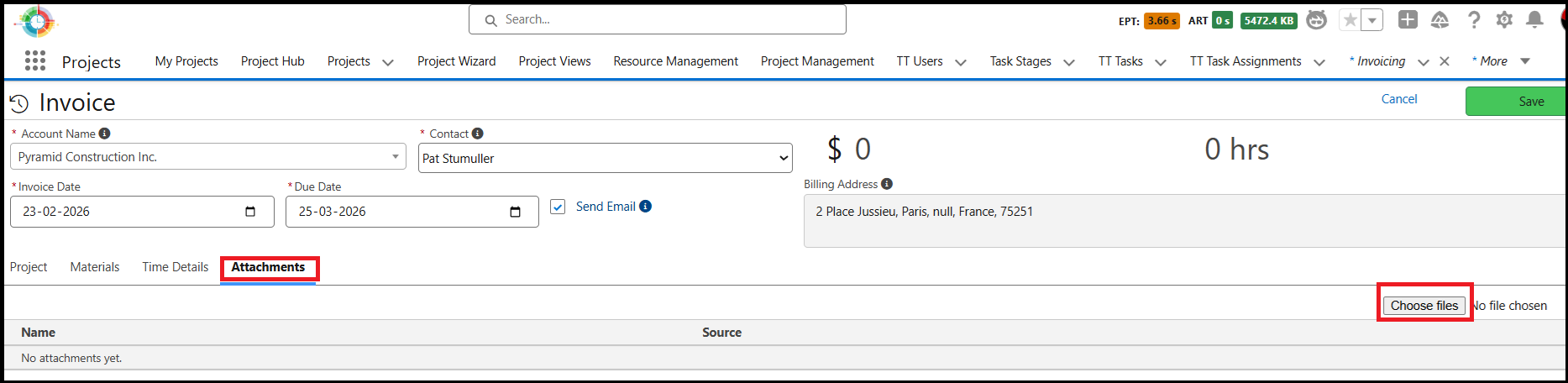
Click the Attachments tab.
Click the Choose Files button.
Select the files you want to attach to the invoice.
Supported file types include Excel, Word, JPG, and similar formats.
Click the Save button to save the invoice along with the attachments.
Add Attachments While Editing an Invoice
- Click here to know more about editing the invoices.
Steps to attach files while editing an invoice:
Open the invoice in Edit mode.
Click the Attachments tab.
Click Choose Files and select the files you want to attach.
Click Save to update the invoice with the attachments.