
The Location Review tab displays location check-ins on an interactive map, making it easy to verify where employees started and ended their work.
Steps
- Open Location Review.
- Select the required date range.
- Review the markers displayed on the map.
- Use the legend to identify:
- Start locations
- End locations
- Clustered markers
- Zoom in or out to view locations more clearly.
- Switch between Map and Satellite view if required.
Use the map to confirm that users checked in from the expected locations before approving their records.
Approving Time Entries
- Click the Pin icon on the map to view the selected user's time entries.
- In the pop-up window, review the user's time entries along with their current Approval Status.
- To view detailed information for a time entry, click the Document icon.
- To approve the time entry, click the OK button.
This allows managers and approvers to review the recorded time details before approving the associated location record.
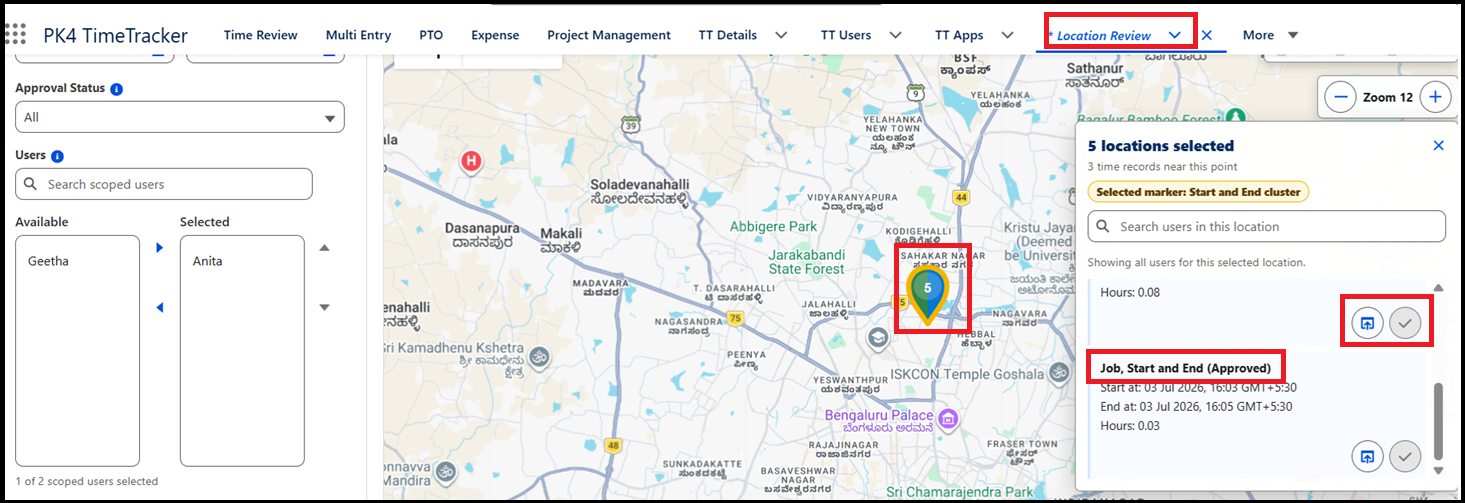
Each location record includes badges indicating the locations captured during the user's work session.
- Start – The location where the user began the activity.
- End – The location where the user completed the activity.
These badges help approvers verify that users started and ended their work at the expected locations.