Conflicts in Project Tasks
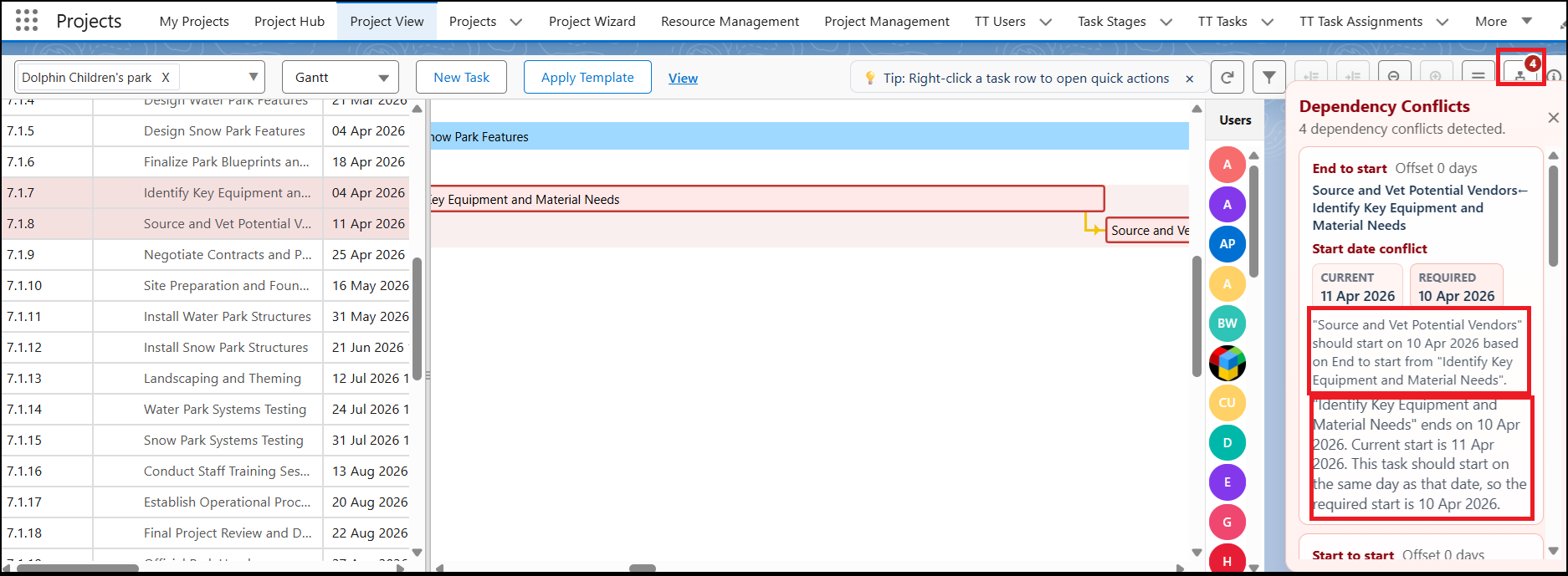
As a Manager, you create Projects, define Tasks, and set Task Dependencies. Whenever you make changes to a task’s Start Date or End Date, the system displays a Conflict Alert.
The Conflict icon available on the Project View page menu bar shows the number of conflicts detected.
When you click the icon, the system displays detailed information about each conflict.
What Are Conflicts?
Conflicts occur when task dependencies are affected by schedule changes.
Task dependencies define:
- Which task should start after another task ends
- Which tasks should start at the same time
How to Set Task Dependencies
To mark task dependencies:
- Go to the Project View – Gantt Page.
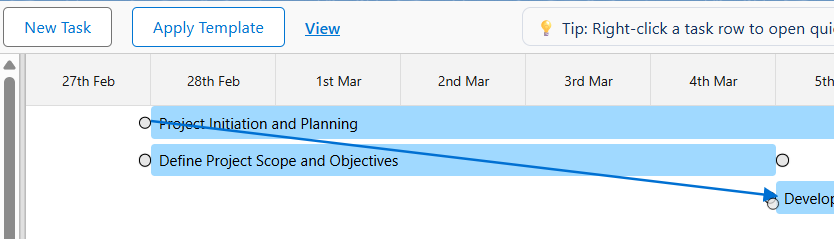
- Hover over the blue taskbar.
- You will see a small circle at both the start and end of the taskbar.
Start-to-Start Dependency
If two tasks must start at the same time:
- Drag a line from the start of one task bar to the start of another task bar.
- This creates a Start-to-Start dependency.
End-to-Start Dependency
If a task should begin only after another task finishes:
- Drag a line from the end of the first task bar to the start of the second task bar.
- This creates an End-to-Start dependency.
Once created, the task dependency is successfully set.
When Do Conflicts Occur?
Conflicts appear when:
- You modify the Start Date or End Date of tasks that have dependencies.
- A task is scheduled to start before its dependent task is completed.
- Dependency rules are violated due to scheduling changes.
Conflicts act as alerts that notify you about scheduling issues and help you take corrective action.
Viewing Conflicts
A Conflict icon appears in the menu bar whenever dependency-related changes create conflicts.
The icon displays a count indicating the number of conflicts.
When you click the icon, you can view:
- The affected task name
- Details explaining why the conflict occurred
Resolving Conflicts
After reviewing the conflict details, you can:
- Reset the changes to restore valid task scheduling, or
- Ignore the conflict if the change is intentional and required.