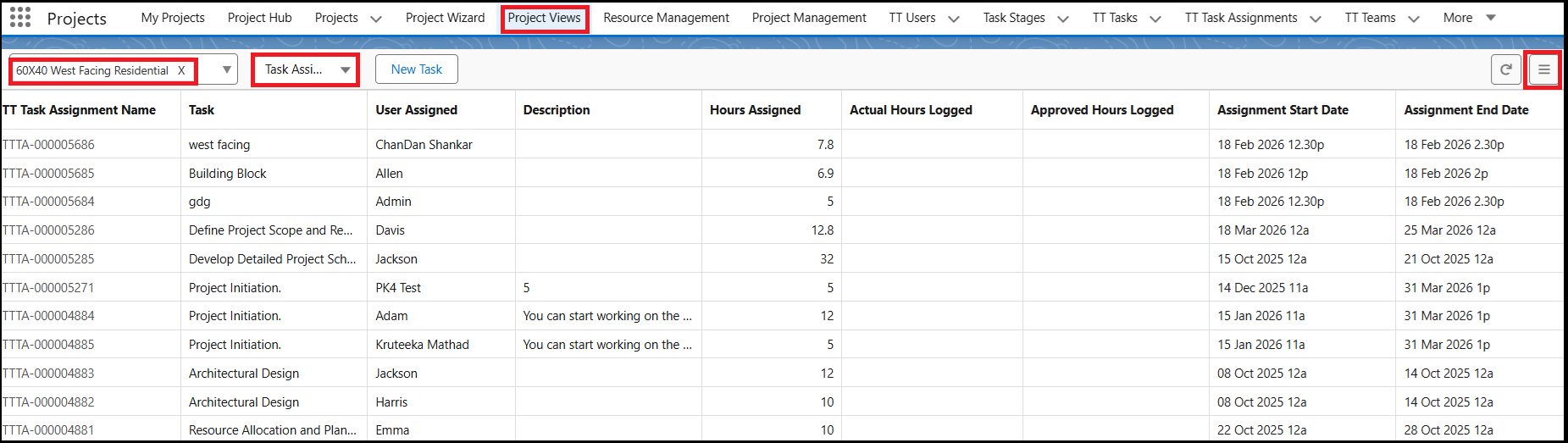
You can now view all the tasks assigned to users directly from the Task Assignments list in the Project view page. This list provides a centralized view of task distribution, helping Project Managers easily monitor assignments and user workload.
How to view Task Assignments in a Project
From the Project Views page, select the required Project.
In the dropdown menu, select Task Assignments.
The Task Assignments list will be displayed, showing all the tasks assigned to users for that project.
By default, the list displays a set of standard fields. You can customize the list view based on your requirements.
How to customize the fields in the Task Assignments list
Click the Hamburger button in the list view.
Select the fields you want to display.
The list will update to show the selected fields.
This feature enables Project Managers to quickly review task assignments, track responsibilities, and make informed decisions without needing to navigate to multiple pages.