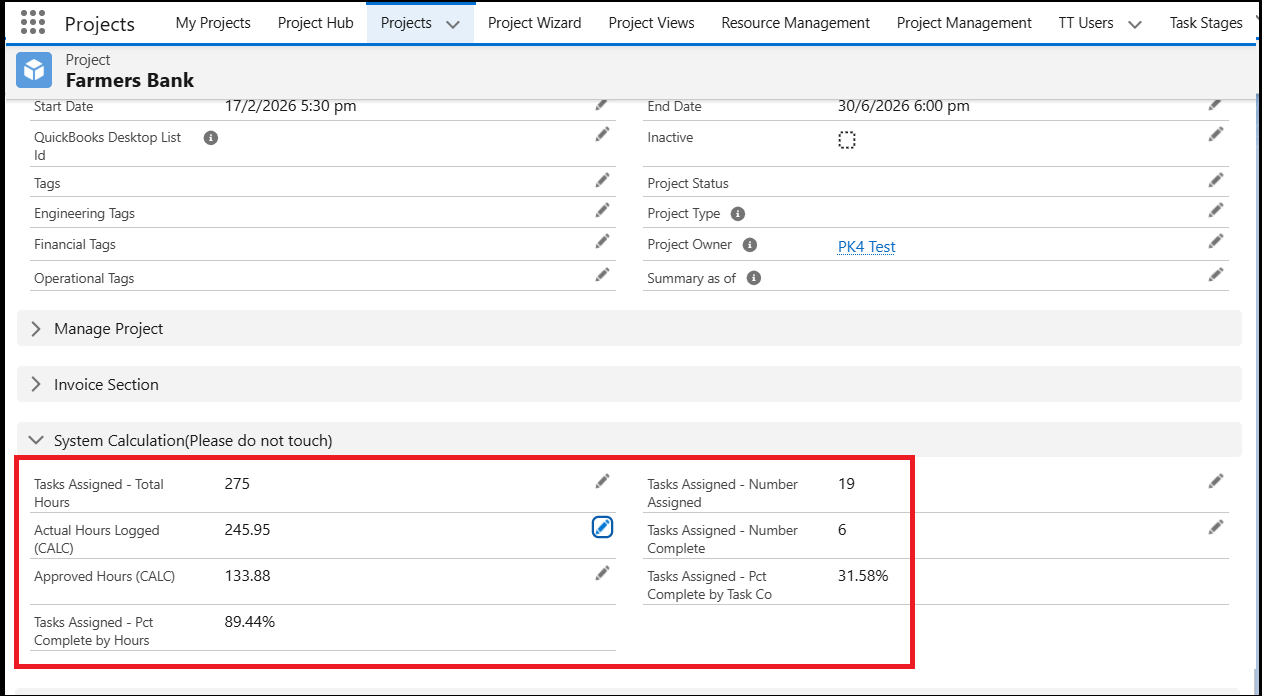
You can now get a quick overview of the hours and progress of your projects directly from the Projects page.
The Project details page includes roll-up fields that display key information such as Total Project Hours, Assigned Hours, Actual Logged Hours, Approved Hours, Task Completion, and Percentage of Completion. These fields provide a centralized view of project performance and help Project Managers monitor progress effectively.
Benefits of these Project roll-up fields
These fields help Project Managers quickly understand the overall progress of their projects. They provide real-time visibility into assigned, logged, and approved hours, making it easier to track whether the project is on schedule. Managers can easily identify delays, incomplete tasks, or missing time entries and take timely action.
By having all key project details in one place, these roll-up fields improve planning, decision-making, and accountability. They also reduce manual tracking and support better follow-up with users to ensure work is completed as per the project plan.
Details of the roll-up fields on the Project
From the Project View page, navigate to the System Calculation section to view the following fields and their related data:
Total Assigned – Total Hours: Displays the total hours planned or required for the project.
Actual Hours Logged: Shows the total hours logged by users against the project.
Approved Hours: Displays the total approved hours for the project.
Tasks Assigned – Percentage Complete by Hours: Indicates the percentage of completion based on hours worked.
Tasks Assigned – Number Assigned: Shows the total number of tasks assigned to users.
Tasks Assigned – Number Completed: Displays the number of completed tasks.
Tasks Assigned – Percentage Complete by Task Count: Shows the percentage of completed tasks compared to the assigned tasks.
If you want to view detailed information for a specific project, you can navigate to the respective Project View page and review the roll-up data. To monitor the progress of multiple projects, you can add these fields to Project list views or include them in Project reports for easy tracking and regular review.
Overall, these Project roll-up details help you clearly understand the status and progress of your projects. They also support proactive follow-ups with users and ensure that project work and time tracking stay aligned with the planned schedule.