
Creating TT Teams and linking them with Users and Projects
Step 1: Create TT Teams
- Navigate to the TT Teams object.
- Click the New button.
- Enter the TT Team Name.
- Click Save to create the team.
Step 2: Link TT Team with TT Users
- Create a TT User record if it is not already created.
- Open the TT User record.
- In the Assigned to Team field, select the required TT Team.
- Click Save.
Step 3: Link TT Teams with Projects
- Go to the Project Record page.
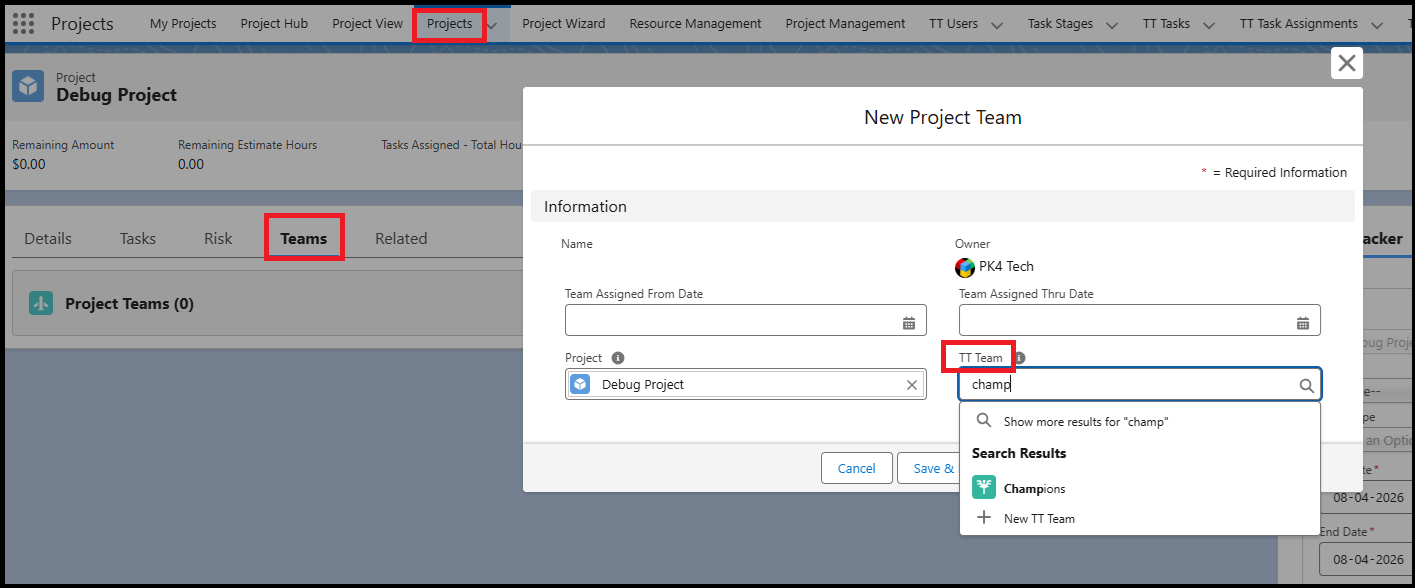
- Navigate to the Teams and click New.
- Search and select the Team in the TT Team field.
- Click Save.
Note: Multiple TT Teams can be associated with the same Project.
Now that the TT Teams are created and linked with Users and Projects, the setup is complete.
As a Project Manager, when you navigate to the Project View page, you will be able to see:
- The users who directly report to you, and
- The users belonging to the Teams associated with the Project.
These users will be available for Task Assignments within the Project.