If you see the following error message while integrating Outlook with PK4 TimeTracker:
PK4 TimeTracker's Salesforce authorization has expired. A Salesforce administrator must authorize TimeTracker again, then click Retry. Your Microsoft connection is still saved; do not repeat Microsoft Connect. Reference: c459bd87-77be-4ce5-848a-
This error occurs when the OAuth authorization for the PK4 TimeTracker application has not been processed or has expired.
To resolve this issue, follow these steps:
Log in to Salesforce as an administrator.
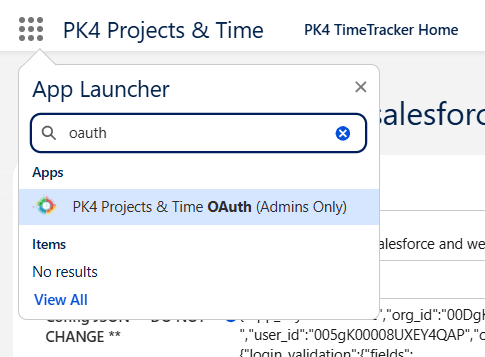
Open the App Launcher and search for PK4 TimeTracker (OAuth).
Click PK4 TimeTracker (OAuth) to process the authorization.
Once the authorization is successful, a success message will appear.
You can now return to the Outlook integration and click Retry to continue.
Note: Your Microsoft connection is already saved. You do not need to repeat the Microsoft Connect process.